ITT440 · Network Programming
Examify↗
A network programming project with a custom Python TCP socket server, a MySQL database, and separate browser interfaces for administrators, teachers, and students. The project puts application development inside a virtual network environment.
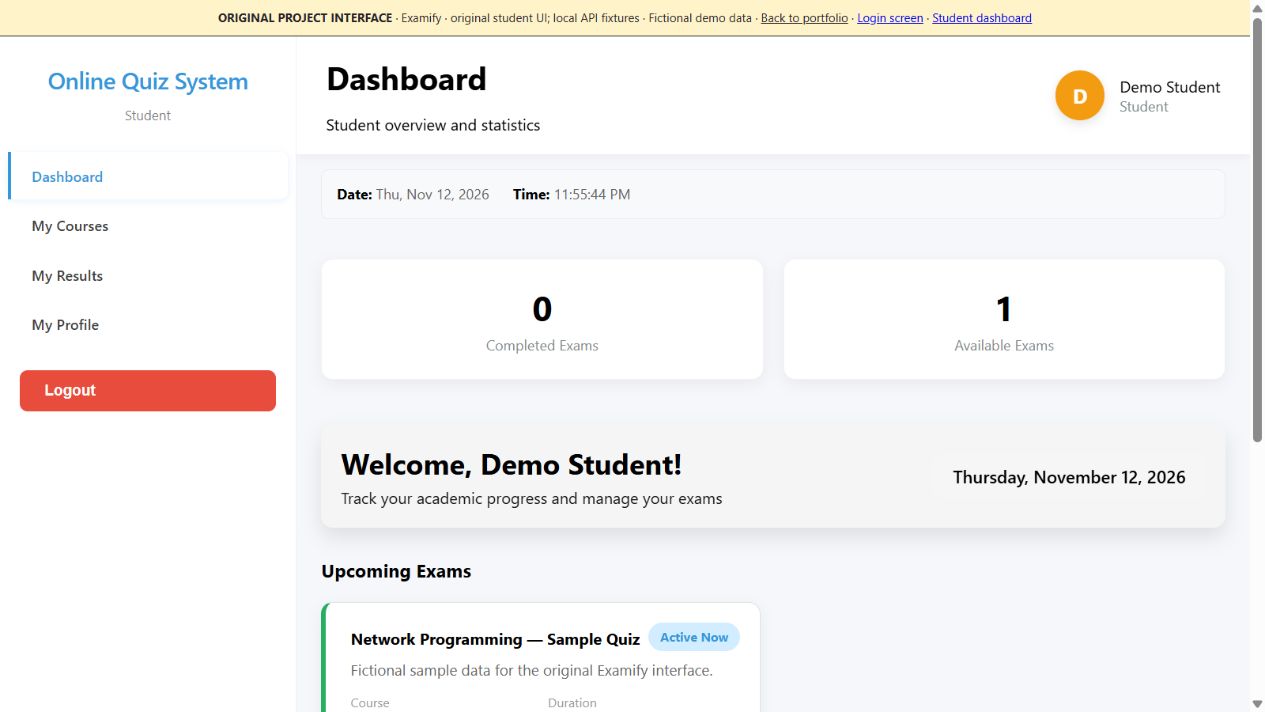
The layout, styling, navigation, and exam screens come from my submitted frontend. A local adapter supplies fictional data in place of the Python/MySQL backend; it does not connect to the Ubuntu VMs.
THE IDEA
what’s the project?
The setup guide describes five VirtualBox VMs: a database server, an application server, a teacher client, and two student clients. Ubuntu hosts communicate over a host-only network.
MY INVOLVEMENT
where I came in.
Academic project work using VS Code Remote-SSH to access the application and database VMs, develop code, and run the system across the virtual lab.
UNDER THE HOOD
how it connects.
Host running VS Code → Remote-SSH → Ubuntu application/database VMs. Teacher and student browser clients reach the application server over the lab network. The application communicates with MySQL.
- A threaded Python server accepts TCP connections, parses HTTP requests, and dispatches application routes.
- Role-specific interfaces support exam management, question management, student participation, and results.
- The deployment guide covers VirtualBox setup, static addressing, SSH file access, and connectivity checks.
Lab notes +
The layout, styling, navigation, and exam screens come from my submitted frontend. A local adapter supplies fictional data in place of the Python/MySQL backend; it does not connect to the Ubuntu VMs.
IN THE ORIGINAL LAB
a quick walkthrough.
- Start the database VM, then the application VM, followed by teacher and student clients.
- Verify VM-to-VM connectivity and open the application/database folders using VS Code Remote-SSH.
- Start MySQL and the Python application server using local lab settings.
- Open the application from a client browser, create a sample exam as a teacher, then submit it as a student.